

The 1-on-1 meetings during Industry@Tallinn & Baltic Event will take place from 17th to 20th of November 2026 onsite in Nordic Hotel Forum and online. Below you will find the timeline for scheduling meetings as well as the rules and regulations for our meeting platform.
The platform operates on an availability based system, meaning that all meeting programme participants must set their availability in order to be scheduled for meetings.
Meeting requests are only one-sided, it is currently not possible to view received meeting requests on the meeting platform, however they will be sent to you via email before online requests close.
For the ONLINE accreditation holders, there is a possibility to conduct online meetings. Please make sure to add your timezone when setting your availability.
Every meeting lasts 20 minutes with a 5 minute break in between meetings. An announcement will be made when the designated 20 minutes are up.
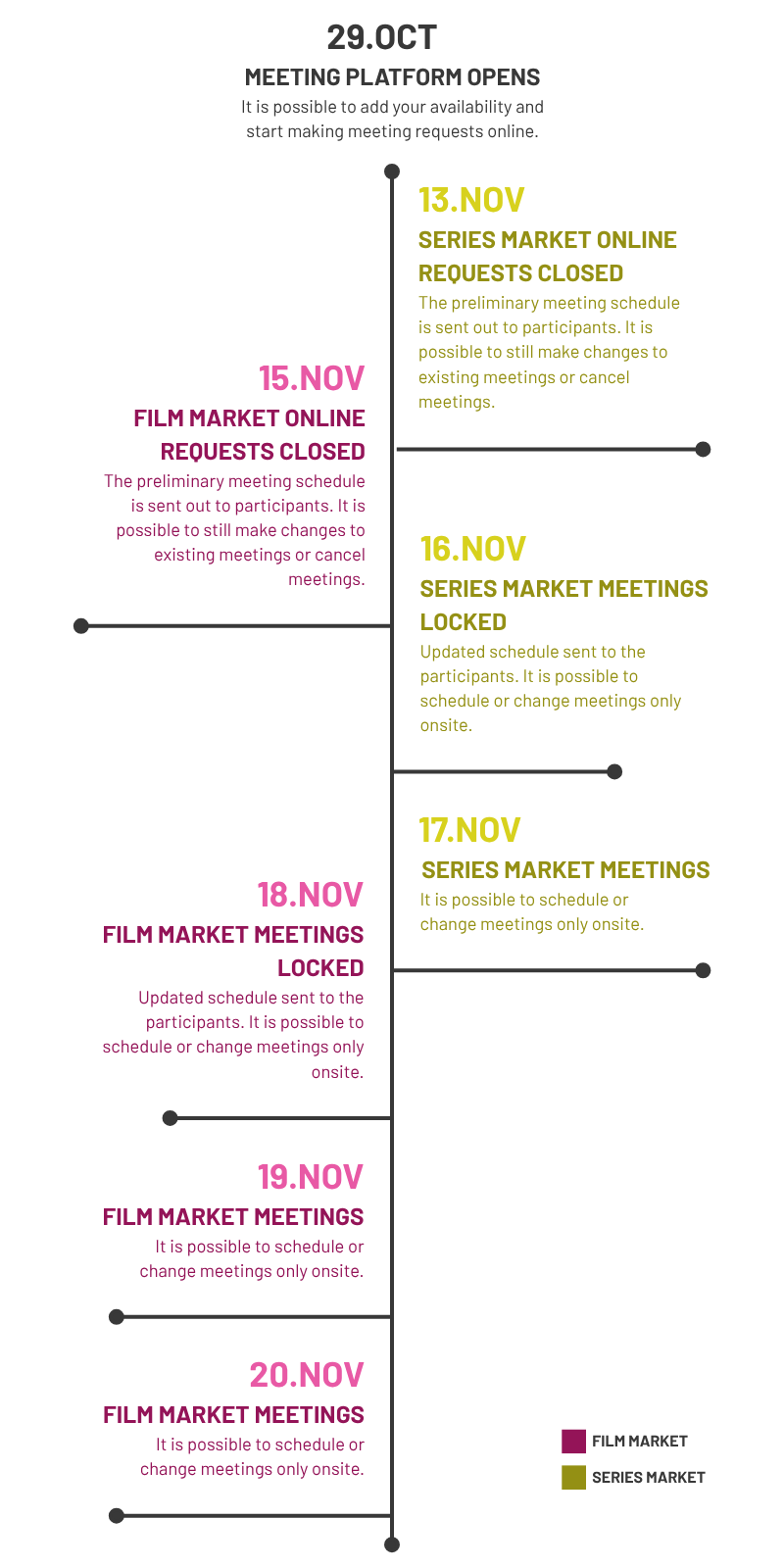
Please keep in mind that meetings will be scheduled consistently throughout the open requests period and there might be changes compared to the final schedule.
For more details, please refer to our Meeting Platform Rules and Regulations.
Make sure you always use the same email address each time you log in to pro.poff.ee.
If you still can’t access the platform, please contact us at industrymeet@poff.ee.
Only Industry Pro, Industry Pro Plus and Student/Talent accreditation holders can use the meeting platform. If you're a PÖFF Guest badge holder and have indicated an interest in meetings during your accreditation process, you will also have access to the selected category meetings. If wish to access meetings, but didn't indicate so during the accreditation process, please email us at industrymeet@poff.ee.
Please check the following:
We schedule meetings only when everyone involved is available. The more availability you add, the more meetings we can schedule for you.
You can set or update your availability anytime.
Please note:
Meetings that are already scheduled will not be changed, even if you update your availability afterward.
If you have empty time slots, there’s a chance that more meetings may still be added.
You can request meetings in two ways:
Log in at pro.poff.ee and select Meeting Requests, OR
Click the request button in the email you received.
Keep in mind: Series projects and Film projects belong to different meeting programmes, so make sure you’re submitting requests in the correct section.
We only arrange meetings for projects.
If you want to meet industry professionals who are not attached to a project, please contact them directly.
This information is not visible to users on the meeting platform, however we will send you an email with received meeting requests ahead of the requests closing deadline.
All in-person meetings take place at Nordic Hotel Forum. Meetings happen in the designated meeting room on the second floor. Each project has a placard on the table to make it easy to find. The room is also listed in your meetings calendar as well as the email you got from us.
Online meetings are held on Whereby.
You will find the meeting link in:
To cancel a meeting, click the “Request to cancel” button next to the meeting you want to cancel.
Here’s what happens when you do:
Additional notes:
You cannot cancel meetings directly from your calendar. The Cancel request button is required.
If you need to cancel several meetings or have an urgent situation, please email us directly at industrymeet@poff.ee.
Log in at pro.poff.ee and scroll to My Industry Appointments.
There you can:
You will also receive your full schedule by email after the requests close.
If you have any other issues, please reach out at industrymeet@poff.ee.